Enterprise UX Work - Walkthrough
Employee Experience - Scotiabank Global Enteprise Delivery Platform
"Soup to Nuts": Project Definition Buy-in, Agile Product Owner Management, Project Management, Team Management, Innovation Buy-in Management, User Research Product Surveys, User Analytics, Personas, User Stories, Design Thinking Workshops, Purchase Behavior Psychology, Sitemaps and Screen/User Flows, Information and Content Architecture, Annotated Wireframes and Design Systems, Iterative Interactive Prototypes, Usability Testing, Cross Team Buy-in Change Management Facilitation, Micro-Interactions Documentation, Developer Documentation, WCAG 2.2 Accessibility, Enterprise Gamification, QA and Rollout ...
Note: proprietary information removed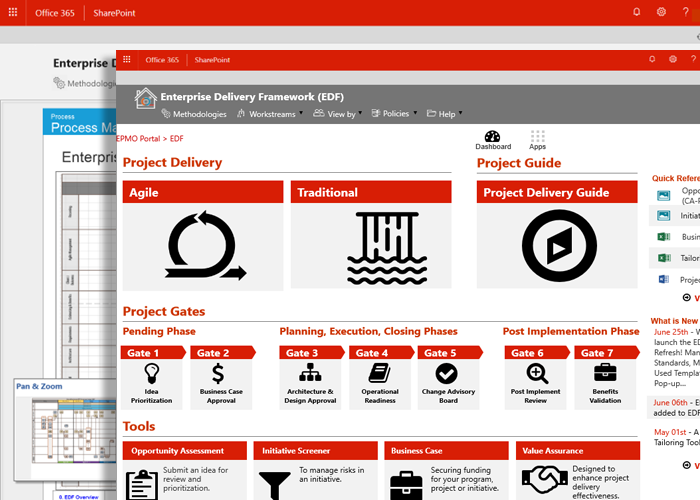
Summary Introduction
Scotiabank, serves 25 million customers in over 30 countries, by over 100 thousand employees and staff.
Situation: Redesign the "Employee Experience" to make the internal portal easier to use by 2000+ staff involed in Enterprise project delivery
Metric: 20% increase in operational efficiencies for the amount of time it takes to plan, develop, deploy and support Enterprise Applications
Action: Using UX Research and modern UI design best practices, new version of of the Enterprise Delivery Portal was launched and adopted by 5000+ IT professionals
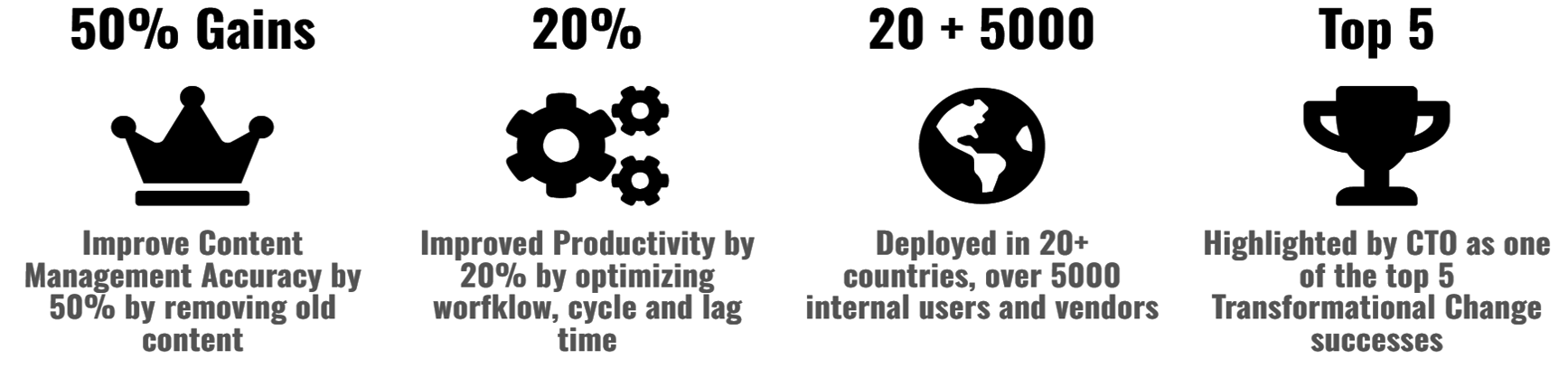
Result: Improved Productivity by 20% by optimizing worfklow, cycle and lag time, as well as improved Content Management Accuracy by 50%
Time bound: On time and on budget in 16 months
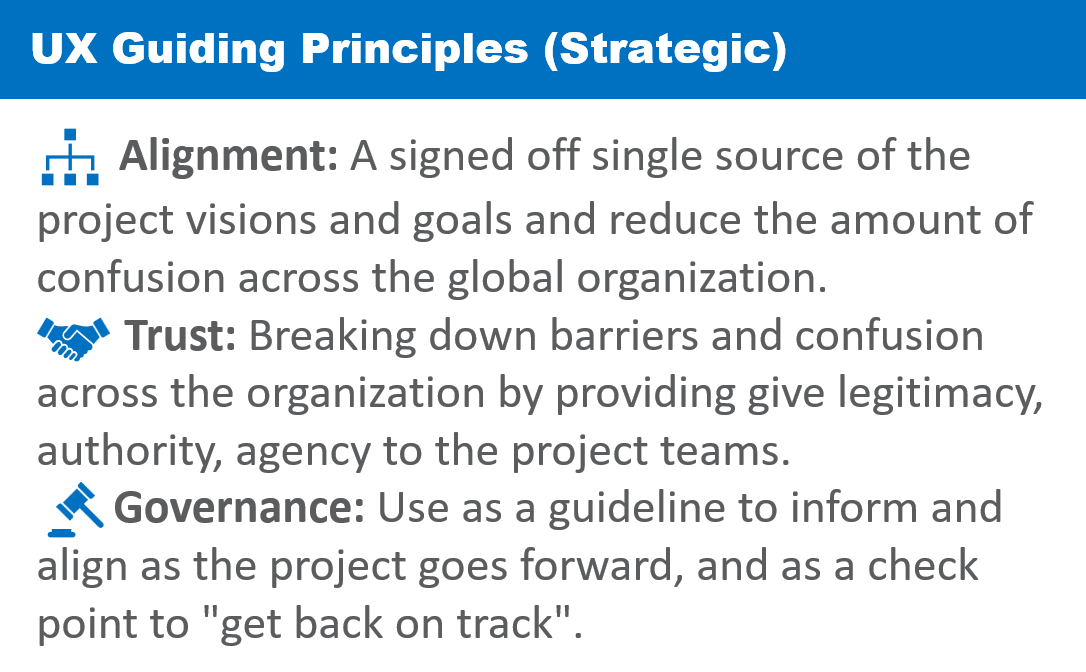
As part of the mandate of the Office of the CTO, improving the Employee Experience is a key strategic goal, especially ensuring the smooth management, collaboration and delivery of complex systems around the world.
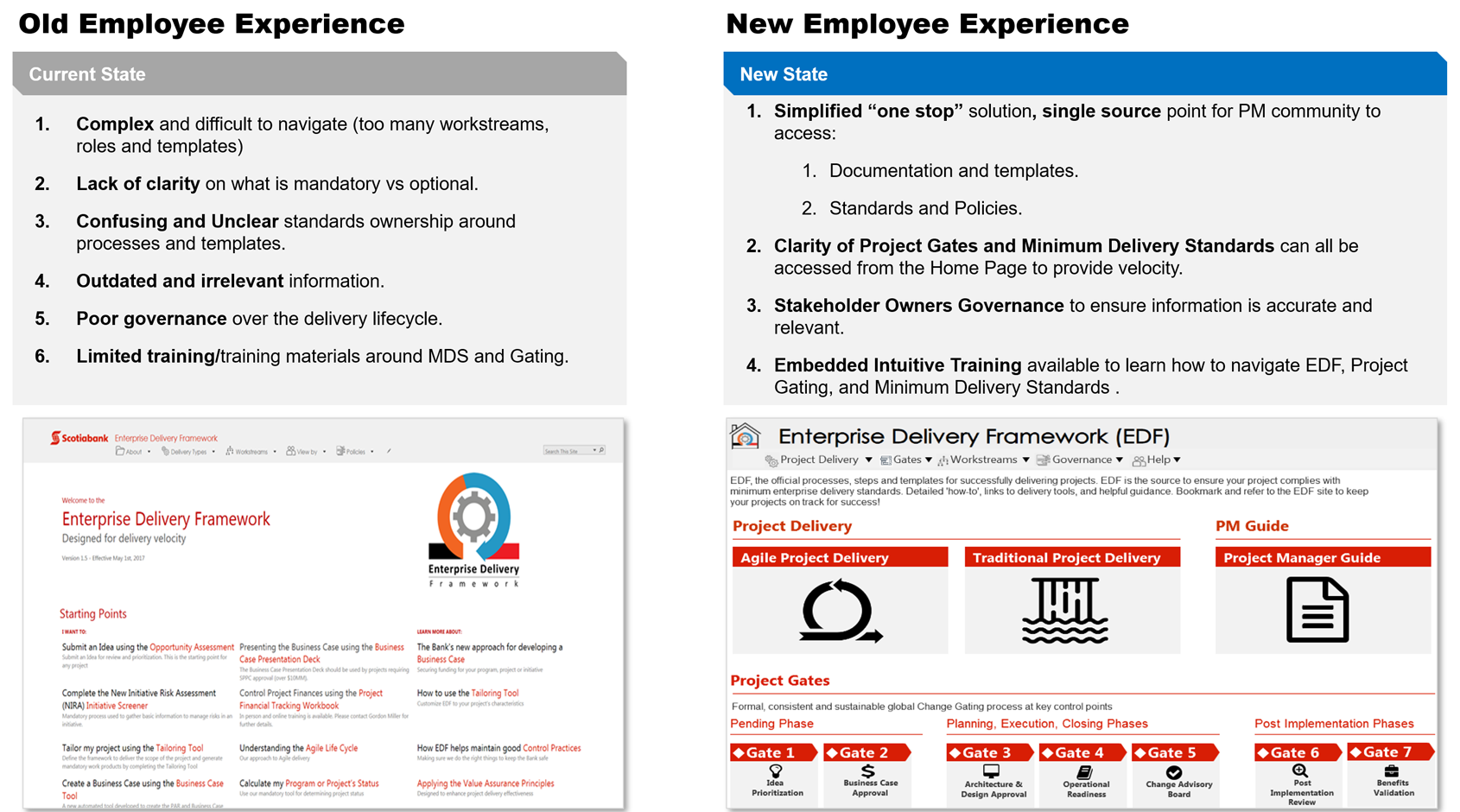
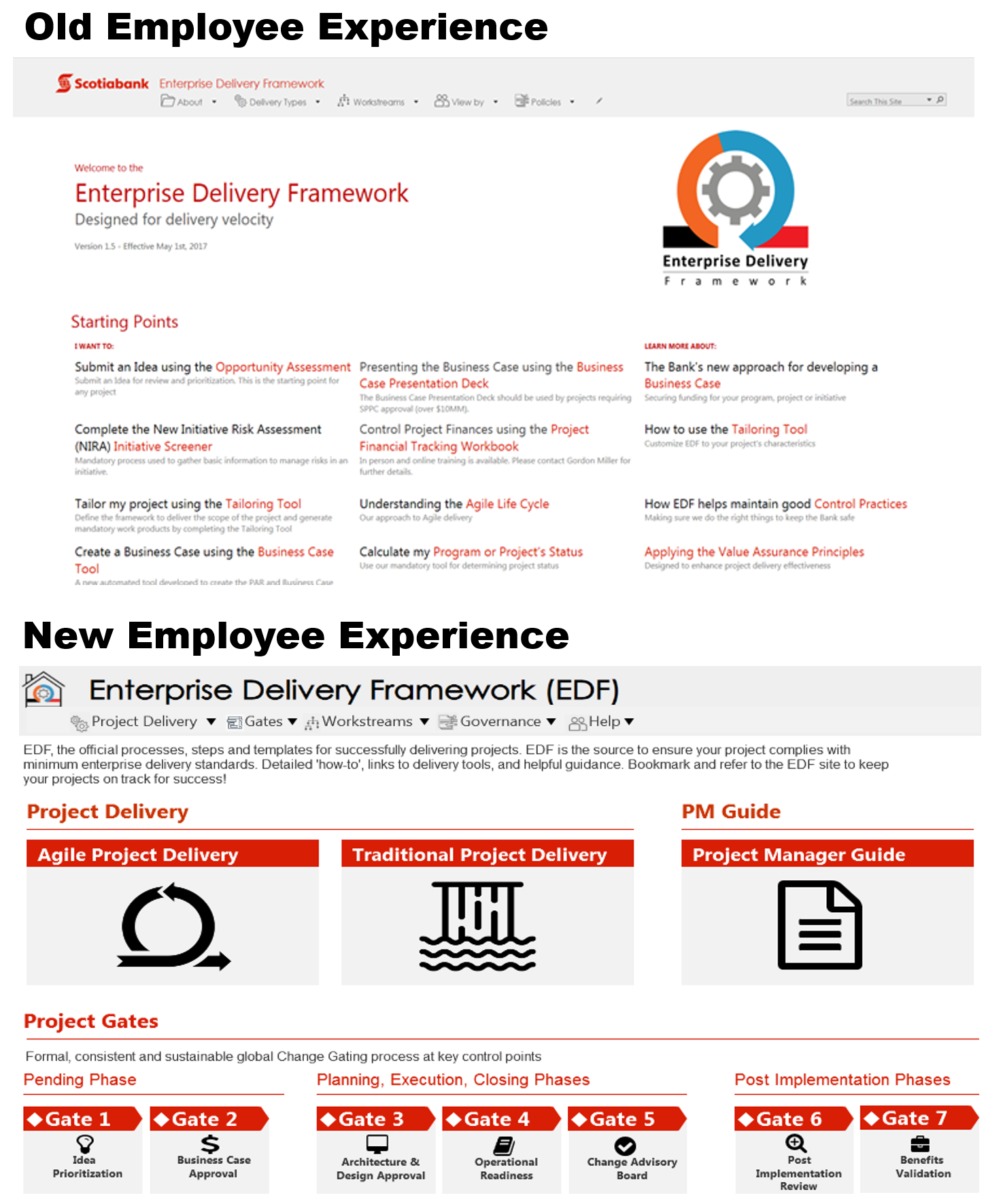
Based on feedback, the current Enterprise SharePoint portal was not doing the job, so it needed a re-imaging:
- A keystone for the organization's Employee Experience
- Make it the trusted official processes, steps and templates for successfully delivering projects
- Improve the efficiency of trying to find key documents and artifacts
- Centralize document repositories and SharePoint systems across the company.
- Comply with the IT control objectives and to also streamline what required.
Successful Final Outcomes
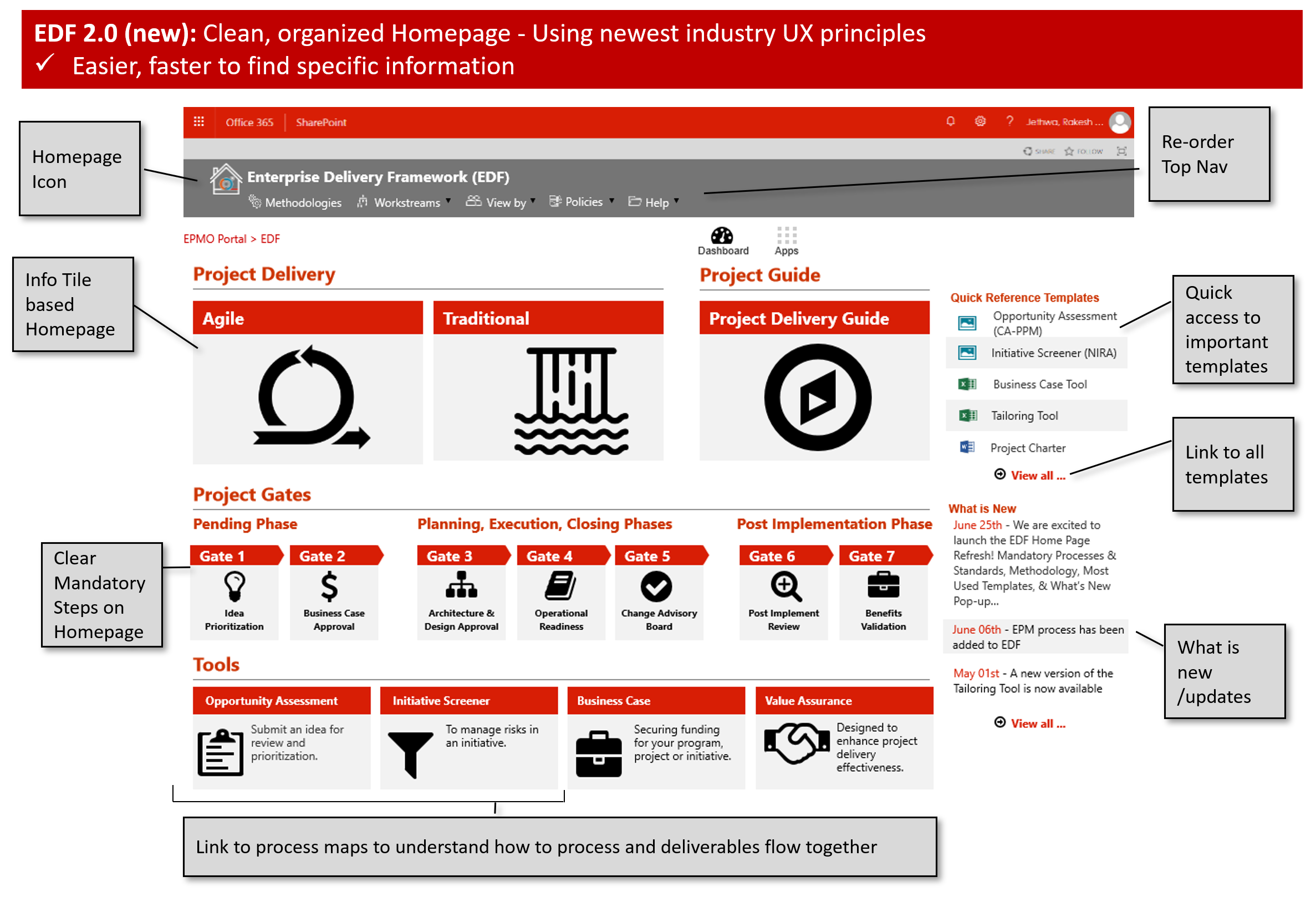
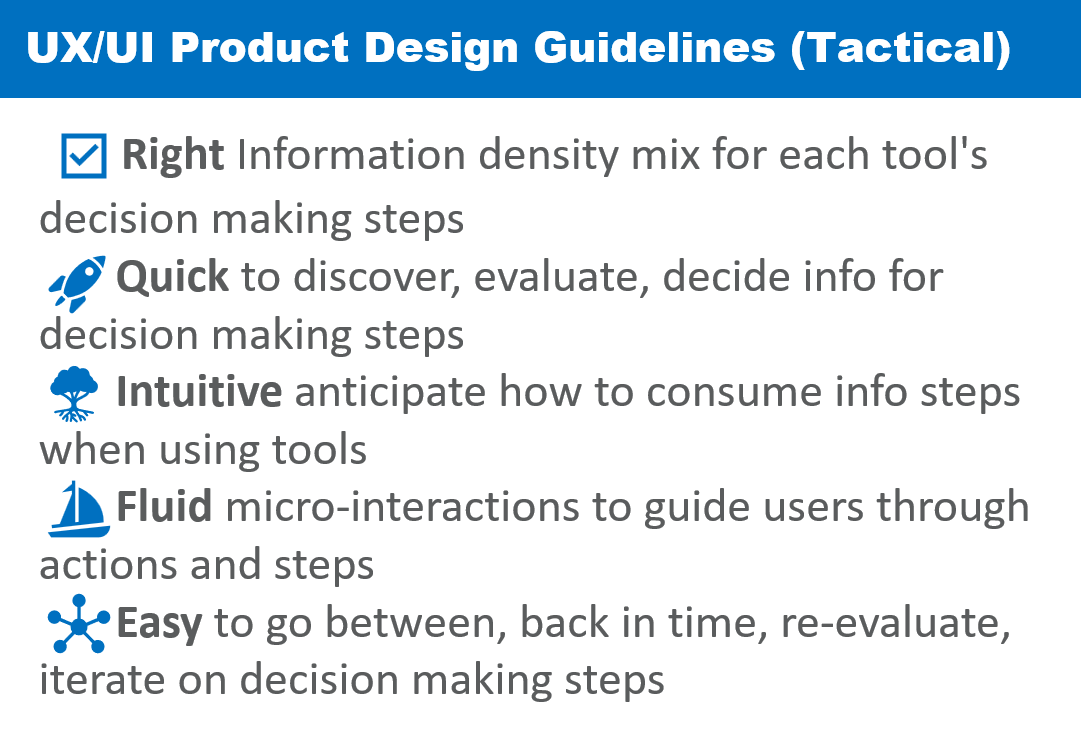
Surface and clarify Project Gates and Minimum Delivery Standards that can all be accessed from the Home Page to provide velocity
- Balance Interaction designs with Information Density of Visualization of Data
- Optimize Content and Uer/Screen Flows for, trusted, quick and easy information
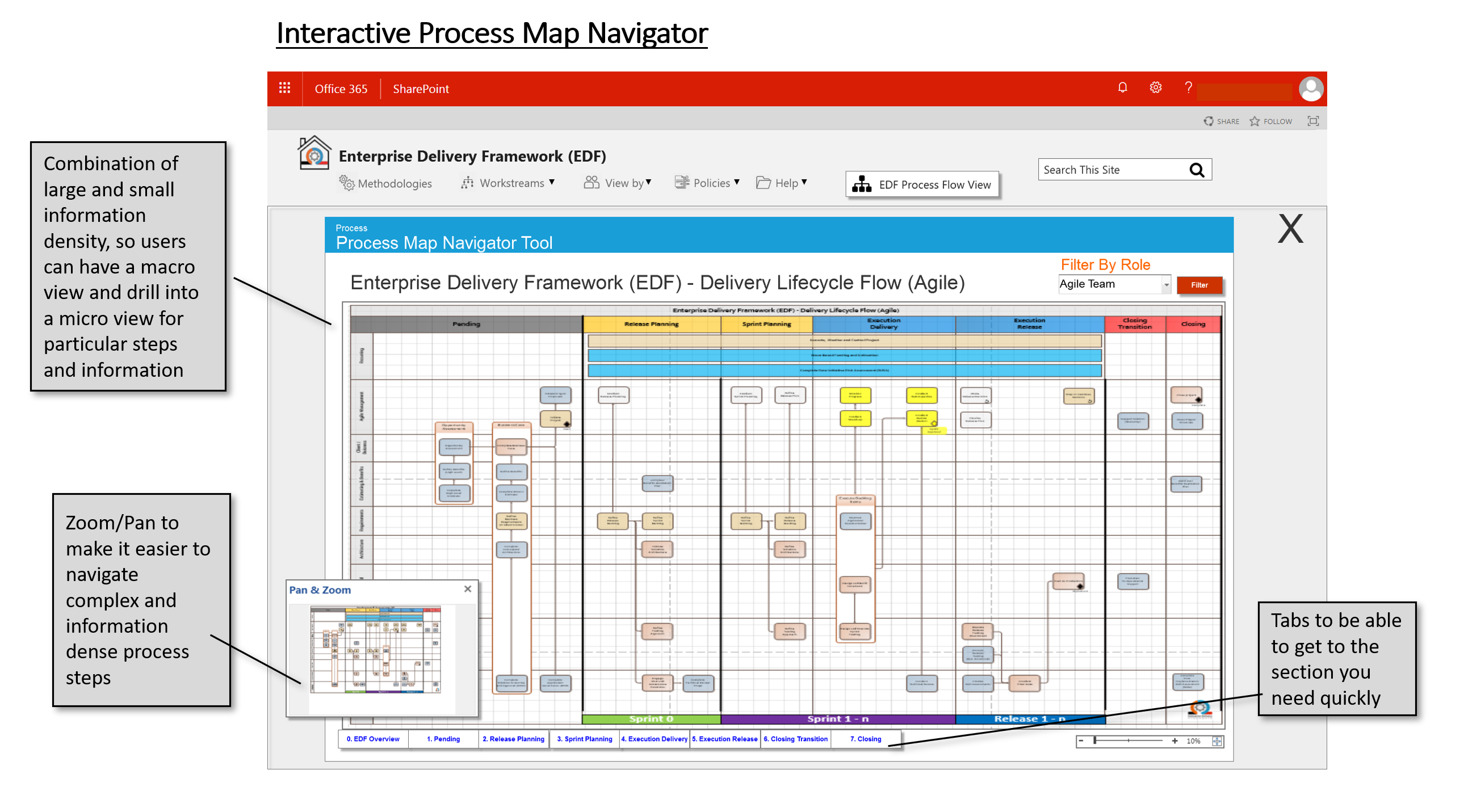
- Use the correct navigation and layouts for different employee tasks and roles

My Role
- UX Lead
- Visual UI Designer
Sprint Team Members: 7
- Product Owner
- UX Lead, Visual UI Designer (me)
- Visual UI Designer (me)
- SharePoint UI Developer
- SharePoint Backend Developer
- 2 Content Designers
- QA Tester
UX Deliverables
- Project Design Strategy
- Change Management Strategy
- Stakeholder Mapping and Buy-in
- Design Competitive Analysis "Art of the Possible"
- Journey Maps
- Personas
- Feature Prioritization
- Sitemaps
- Solution Cards
- User/Screen Flows
- User Stories
- Wireframes
- Interactive Prototypes
- Usability Testing
- Design System
- Developer Component Library Documentation
Success Metrics
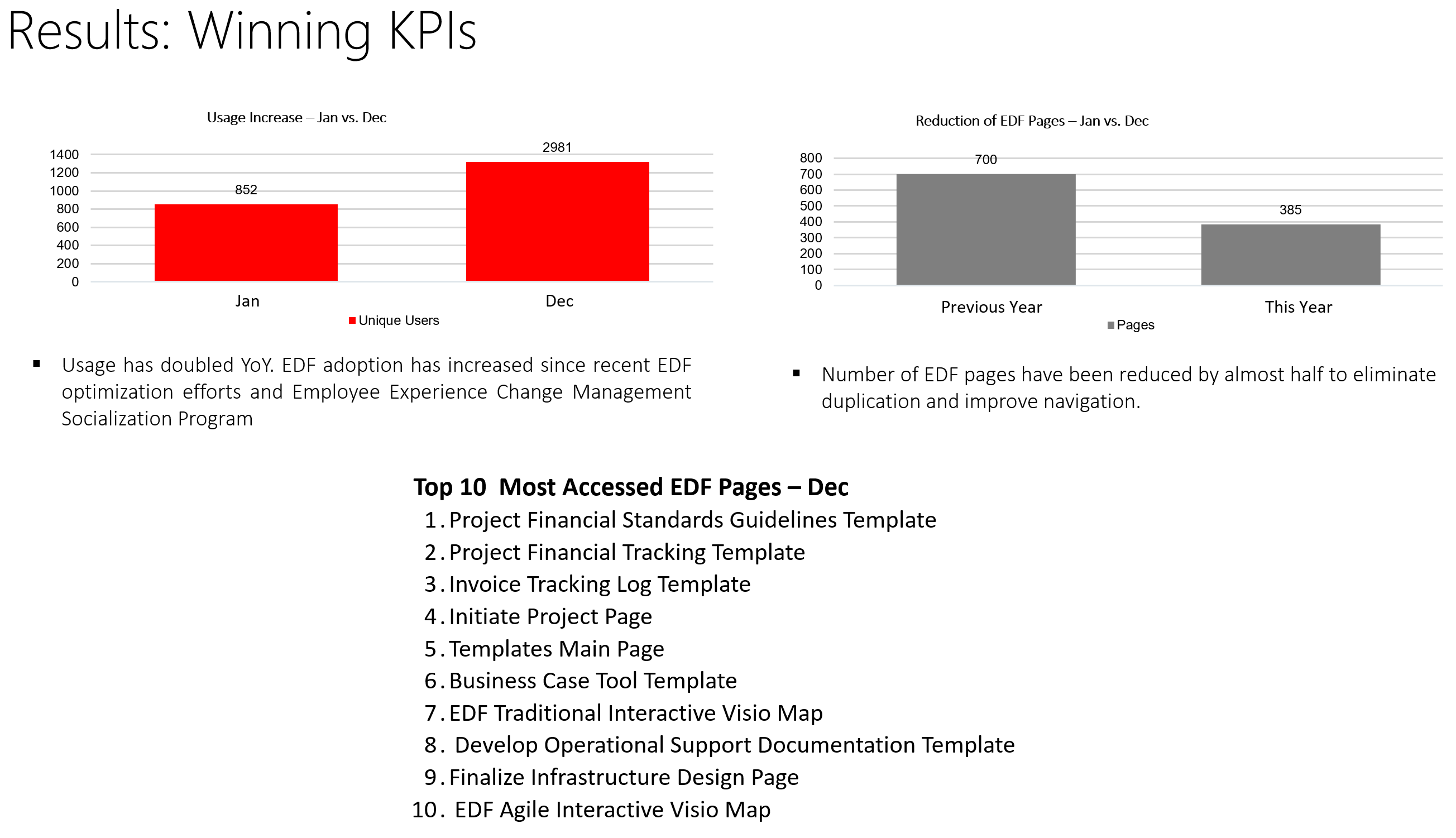
- Reduced management of SharePoint pages by 50% by simplifying content and layout
- Doubled usage in less than 16 months vs. 2-year original plan
- Decreased project delivery costs by 5%, resulting in $millions of cost savings (details proprietary)
- Deployed in 10+ countries, 5000 internal stakeholders
- Highlighted by CTO as one of the top 5 Transformation Change successes
Case Study Details Walkthrough
Part 1/9 - Define: Employee Experience Redesign Strategy
What’s the size of the “breadbox”?
While we knew that the key delivery platform for the Employee Experience is SharePoint, used for document management, collaboration, and communication within organizations, we needed to define a comprehensive approach.
It was realized that the overall goals for the stakeholder users need to be more intuitive, efficient, and user-friendly, ultimately increasing employee productivity and satisfaction. We knew it needed to define the size of the “breadbox”.
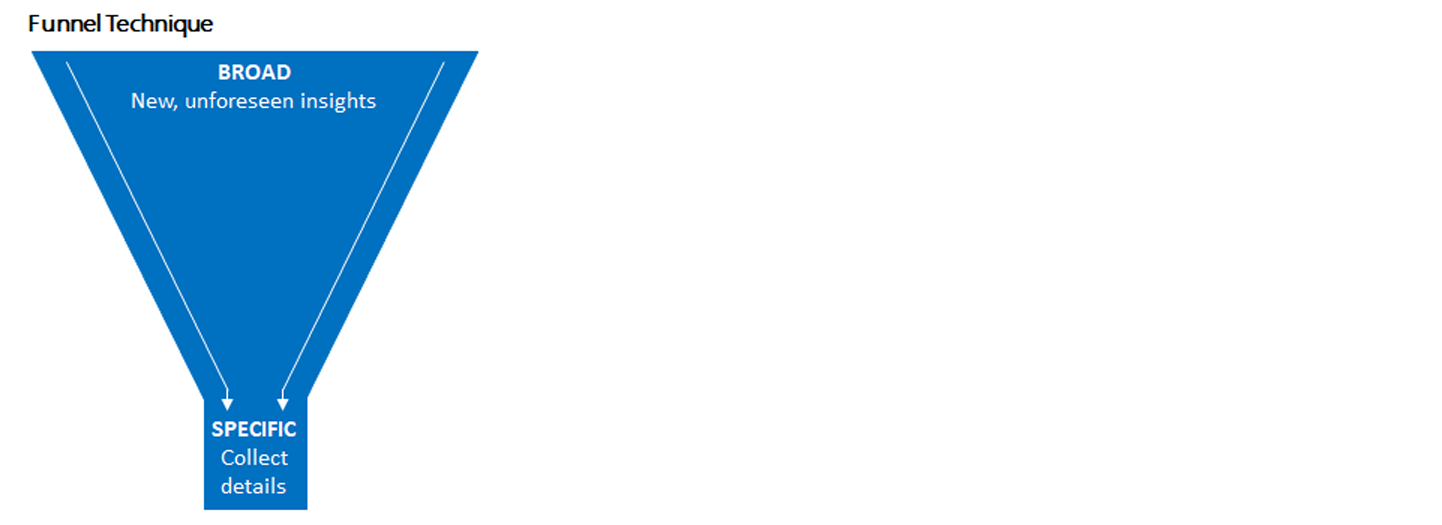
To fulfill these objectives, a mixed-method research approach was adopted. To align with the Business Case, the executive team wanted to put problem definition into a Design step.
Quantitative and Qualitative: all companies are different, a combination of Quantitative and Qualitative methods were chosen by the management team.
- Best Practices Analysis: heuristic analysis of SharePoint's best practices was conducted to identify best practices and opportunities for improvement.
- Analytics Review: usage analytics and heatmaps to understand how employees navigate and use SharePoint in the context of project management and delivery.
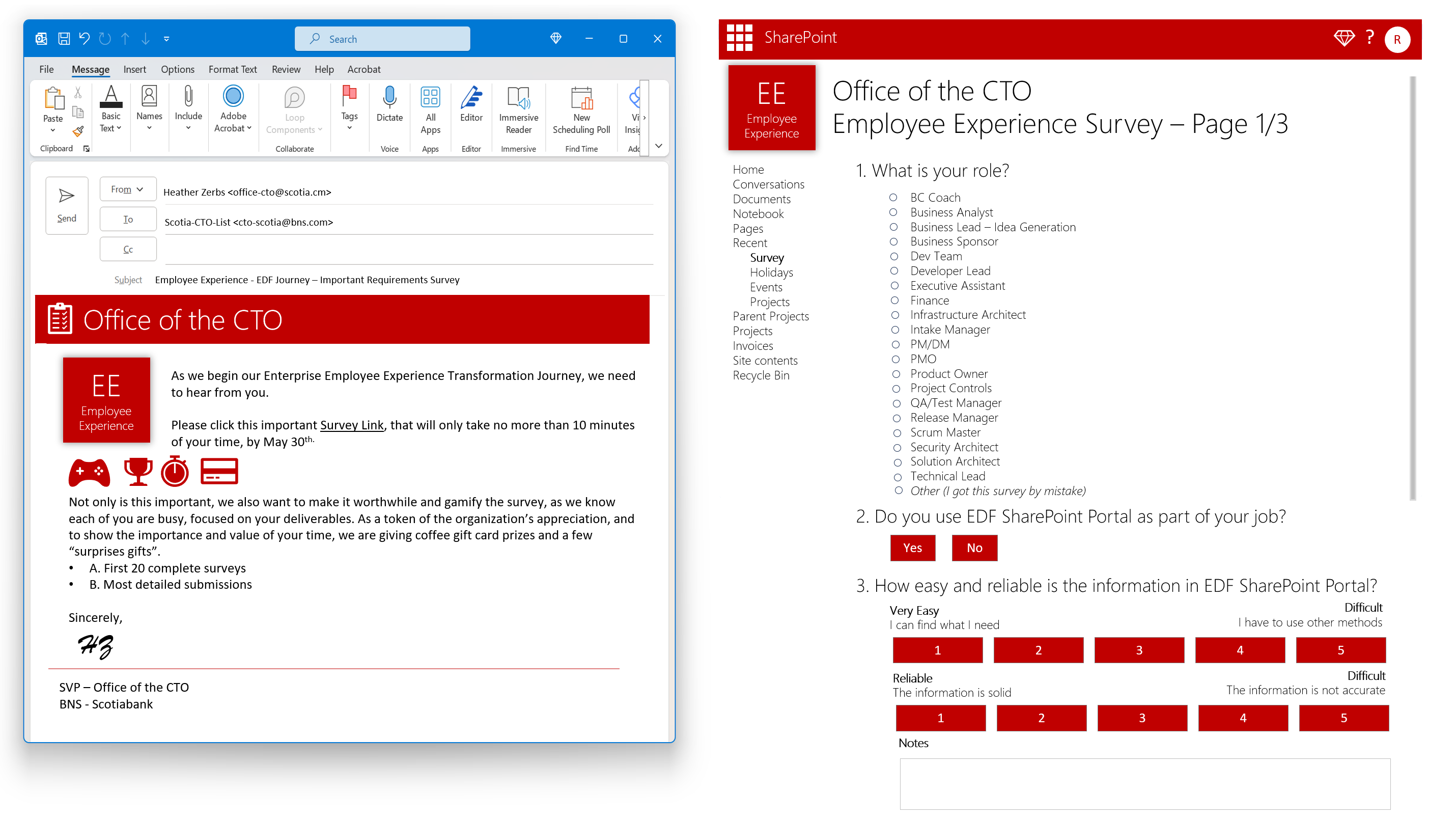
- Surveys: distributed to a representative sample of employees, allowing us to collect quantitative data on their use of SharePoint, preferences, and pain points.
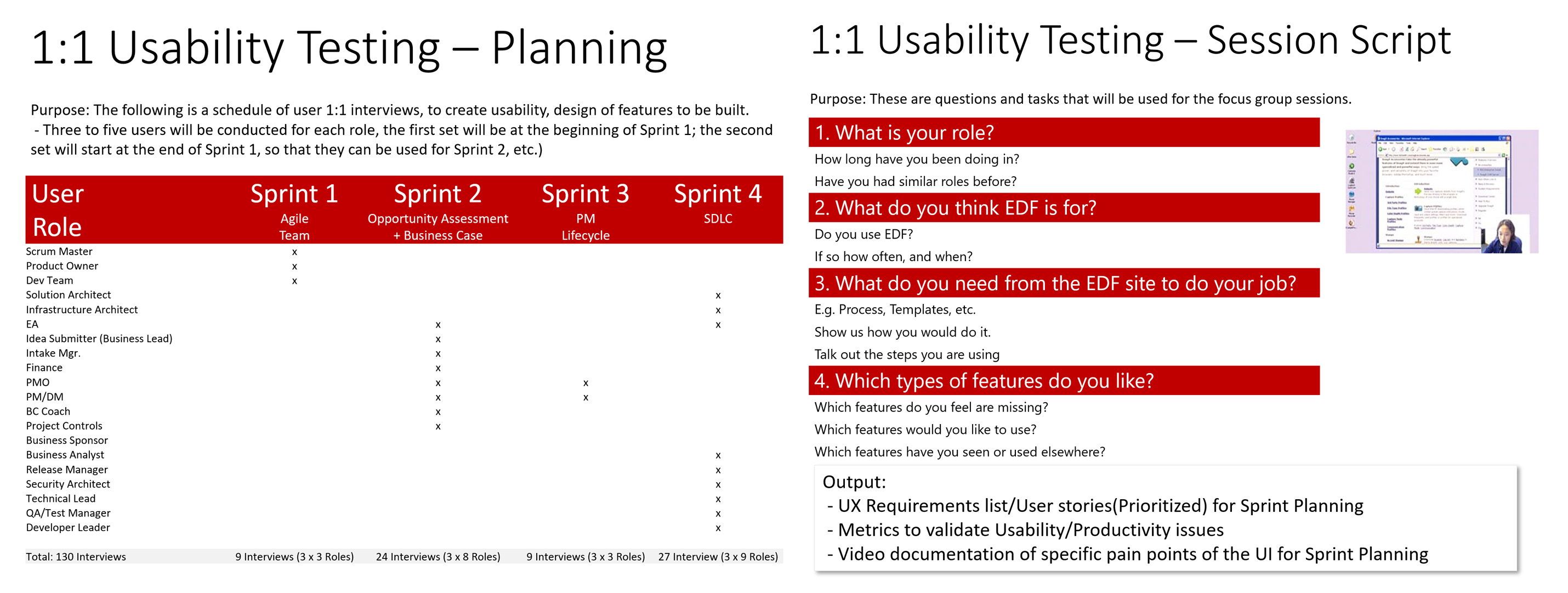
- Sprint Stakeholder Interviews: were conducted with 20 employees from various departments involved in Business Analysis, IT Architecture, Development, Quality Assurance, and Project Management. These interviews unearthed valuable insights into their experiences, needs, and pain points.
- Sprint Usability Testing: of usability testing sessions were organized with a group of employees, providing invaluable insights into the current SharePoint interface's usability issues.
- User Stories: on outputs from the surveys, user interviews, and usability testing, brief, plain-language explanation of a feature or functionality written from a user's point of view
- Wireframes and Prototypes: wireframes and interactive prototoypes in each Sprint, to guide and inform developers, business operations planners, and QA staff before releases.
- Results Tracking: value by tracking increases in usage, produtivity and workflow optimization through better content management.
Part 2/9 - Best Practices Analysis
Envisioning Change - Art of the Possible Technique
Sample Best Practices
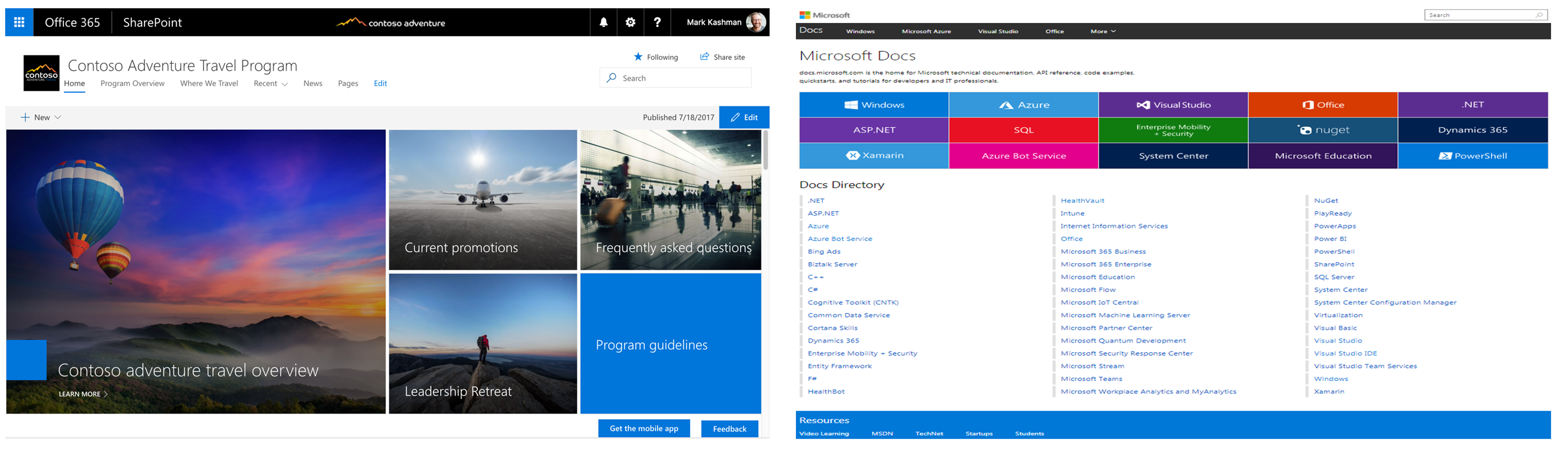
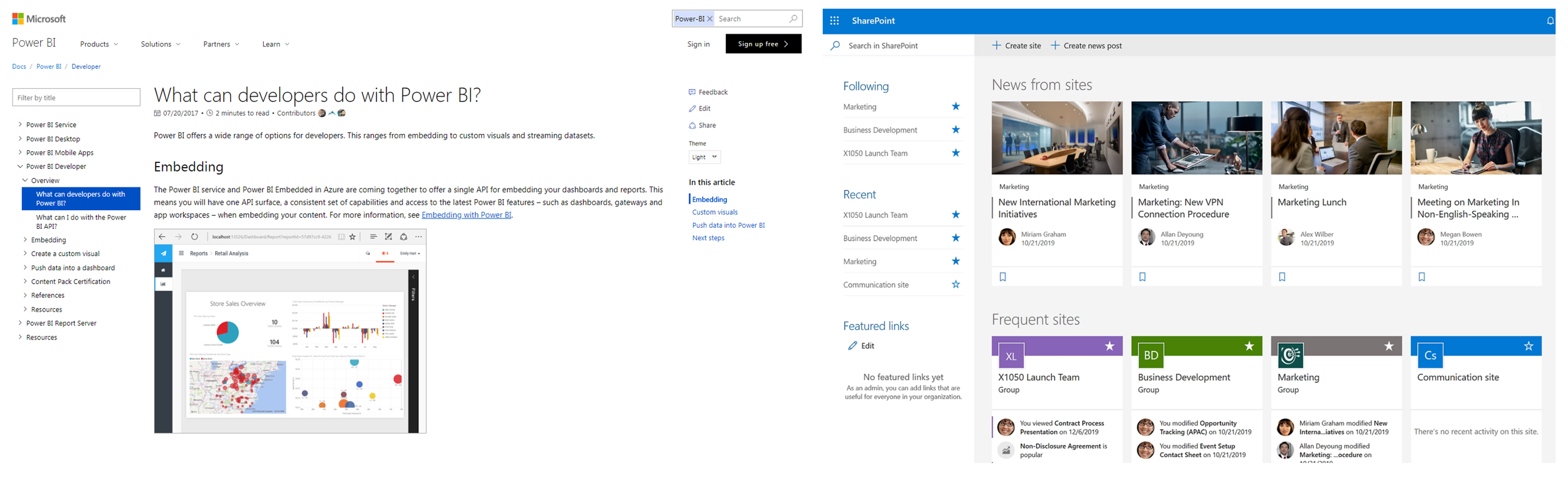
One of the problems in large enterprises is the tendency to look inward. Although top management believes that they are sufficiently aligned, often alignment occurs at a very high, conceptual level, leaving huge margin for divergence in the way each of the members of the Executive Team involve their teams and communicate key organizational messages:
- Understanding that new ways of working are used by other leading organizations
- Breaking down cognitive bias in a risk free way
- Re-orienting old thinking to new Design Thinking to inspire and show the organization is committed to change
Part 3/9 - Data Driven Design - Analytics Review
Re-evaluating Assumptions
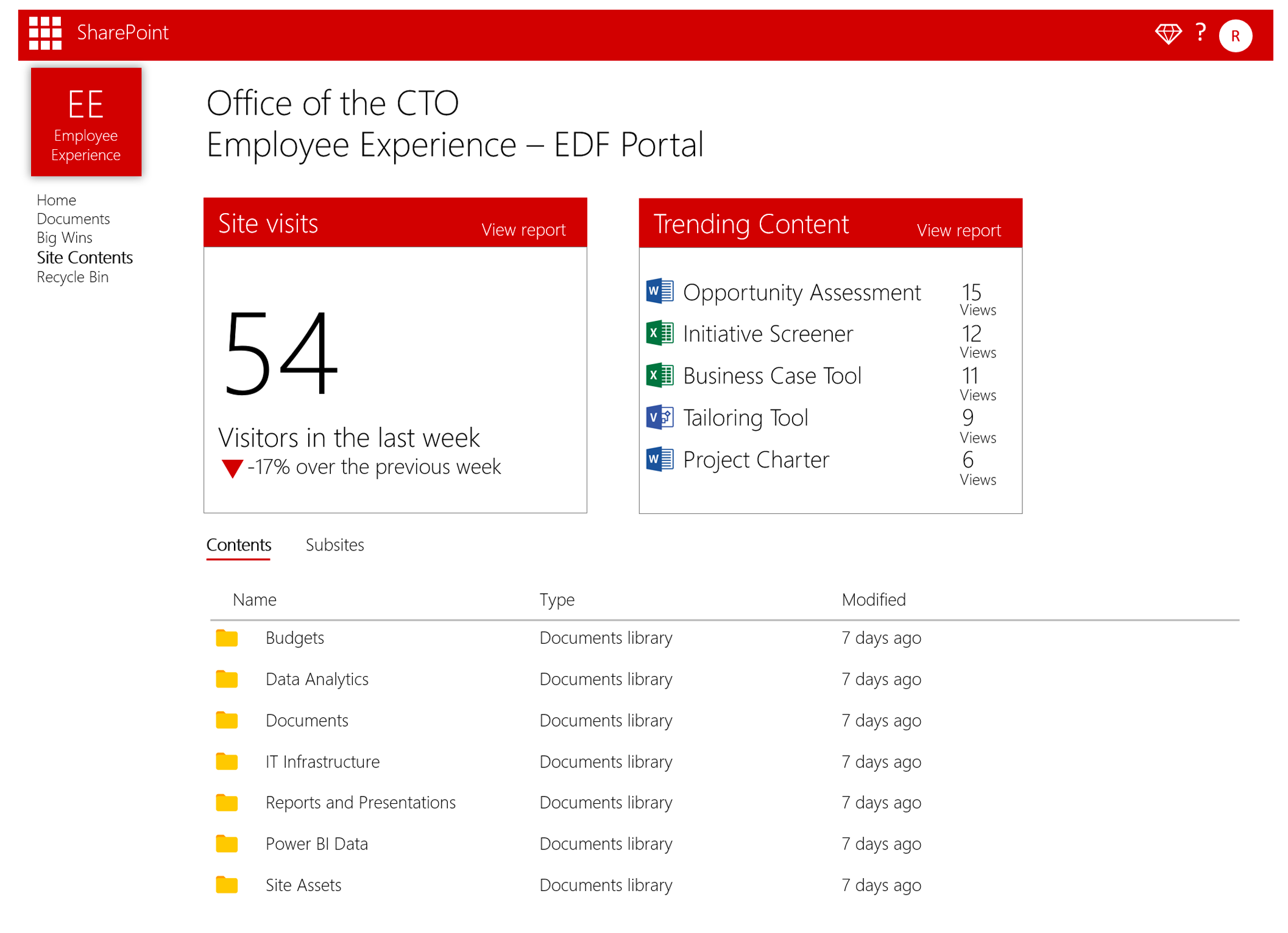
Analytics allows business leaders, designers, and developers to make informed decisions based on user behavior data rather than relying solely on intuition. This data-driven approach helps create more user-centric designs.
- Identify real pain points over assumptions
- Understand User Behavior
- Identifying organizational optimization opportunities
Sample Analytics Report
"You can't really understand another person's experience until you've walked a mile in their shoes"
- Ancient Proverb
Part 4/9 - UX User Survey
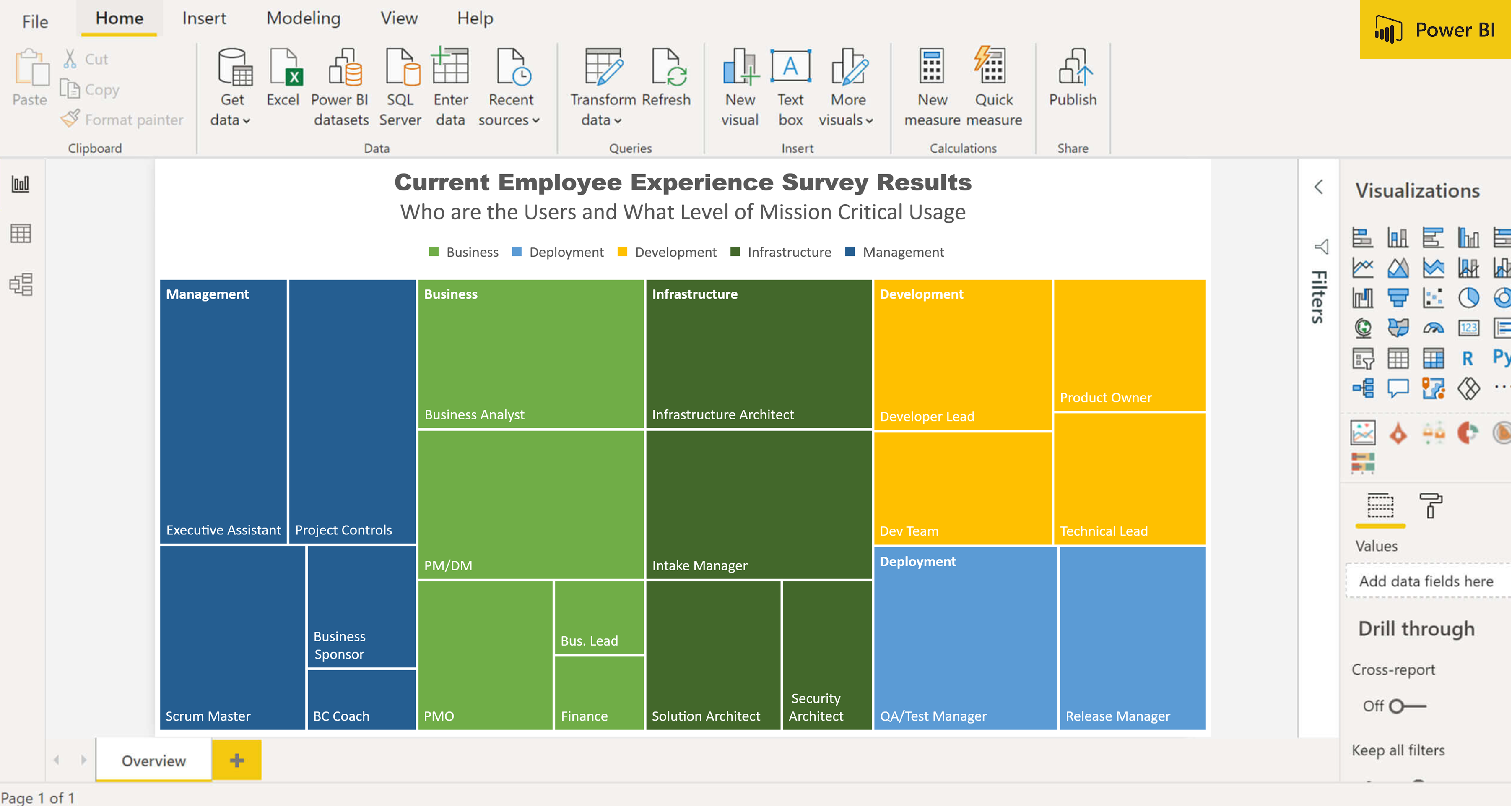
Identifying Target Users
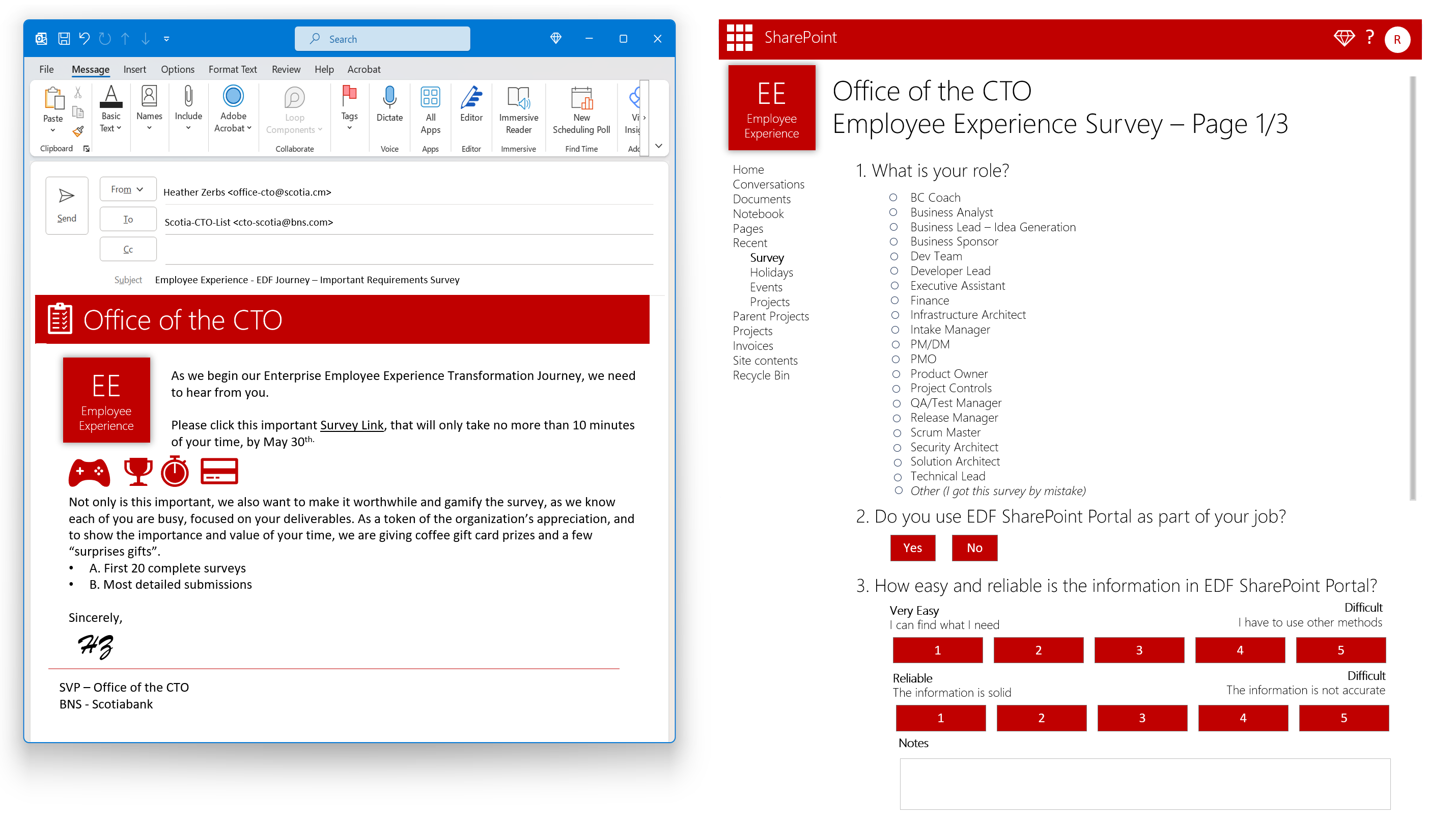
Surveys provided quantitative data that complemented the qualitative findings from user interviews:
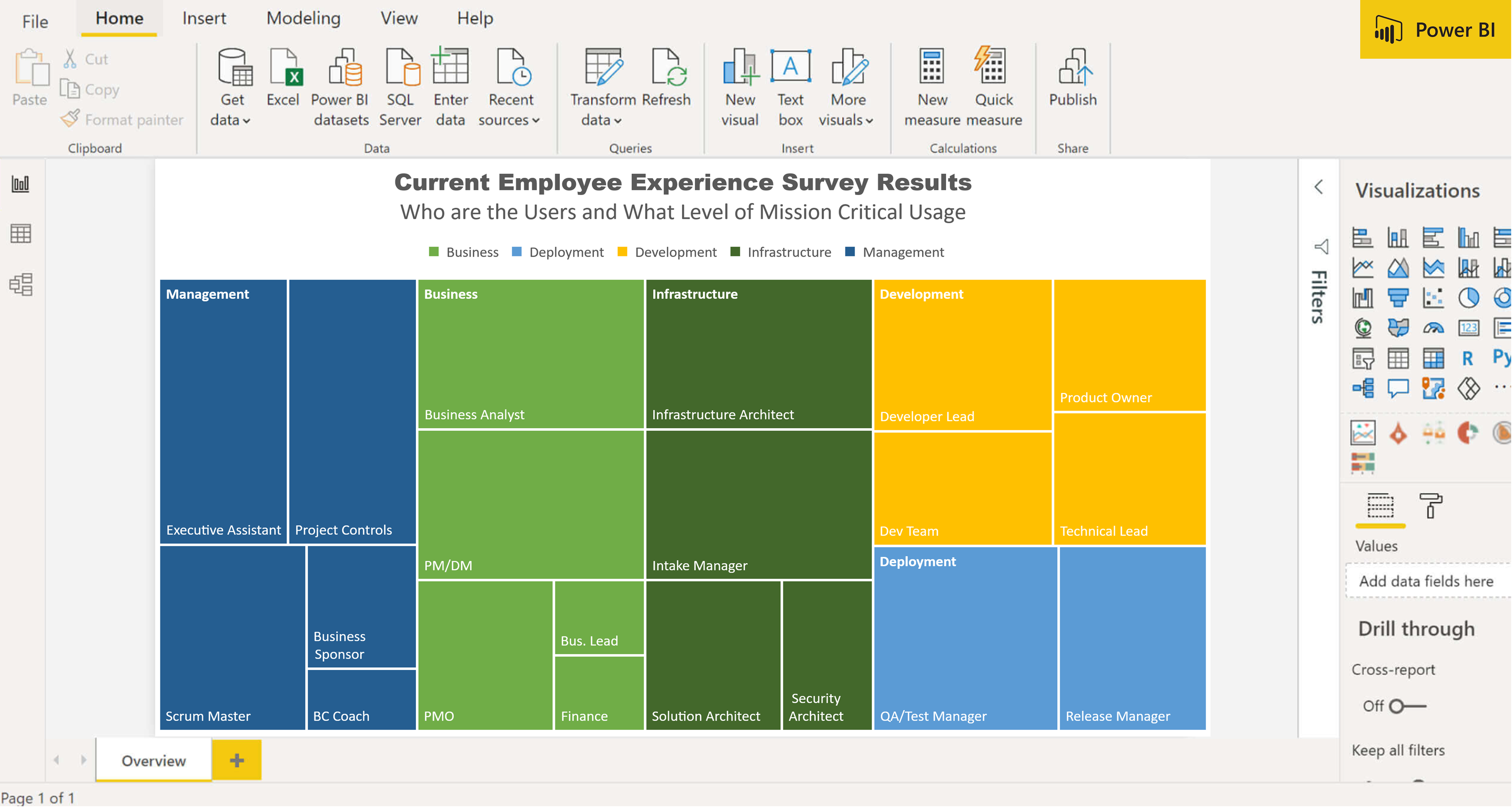
Over 1000 points of quantitative and qualitative feedback were analyzed summarized, to help group areas of focus for the UX design process.
These pieces of feedback were also used to guide UX Personas, User Stories and Visual Wireframing.
- Identify frustration and why there is low satisfaction and broken workflows
- Identify key "hidden" needs that are key to success
- Information Overload and root causes of broken processes
Part 5/9 - User Interviews
Primary information vs. assumptions
Interviews with key stakeholders helped us align business goals with user needs.
- Complex Navigation: found it challenging to navigate through SharePoint, leading to delays and frustration.
- Inefficient Document Handling: handling processes were seen as inefficient and time-consuming.
- Communication Gaps: felt that communication and collaboration features could be improved for seamless project management.
User Testing Planning and Interview Guide
Part 6/9 - Preliminary Findings Report - Current State Analysis, Recommendations
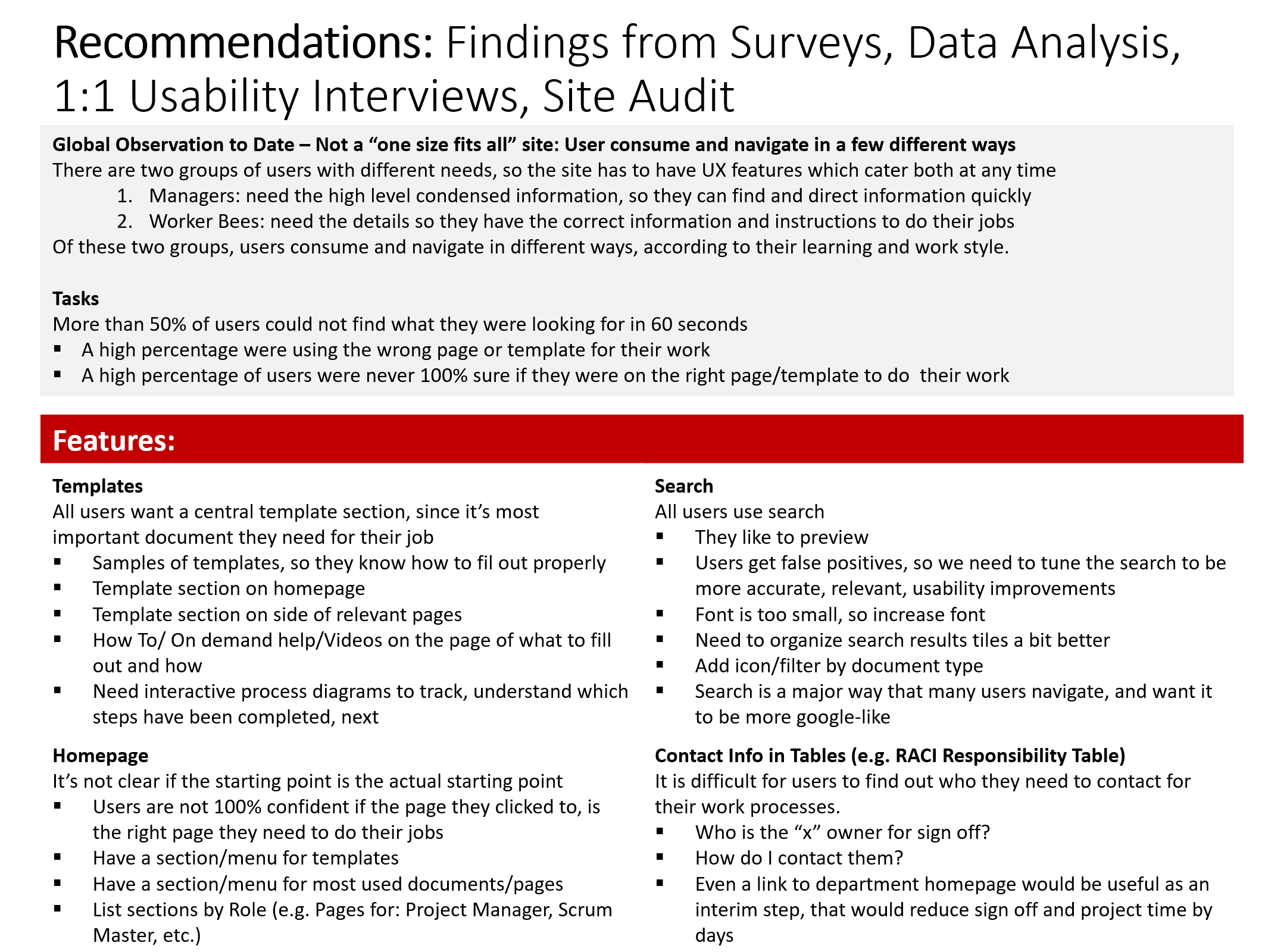
Reporting Findings - Strong Foundational Checkpoint for Project Value
These findings influenced our design recommendations, as we aimed to incorporate these best practices into SharePoint's redesign.
Recommendations: Findings Summary - Current State
- Two groups of users: and navigate in different ways, according to their learning and work style.
1. Managers: need the high level condensed information, so they can find and direct information quickly
2. Worker Bees: need the details so they have the correct information and instructions to do their jobs - Can't find easily more than 50% users could not find what they were looking for in 60 seconds (reasonable amount of time)
- Core Employee Experience IT Value Prop Problems: 100% of users not sure if they were on the right page/template to do their work
Sprint 0 Report Sample
Part 7/9 - User Stories
Agile Planning to align business, design, development needs
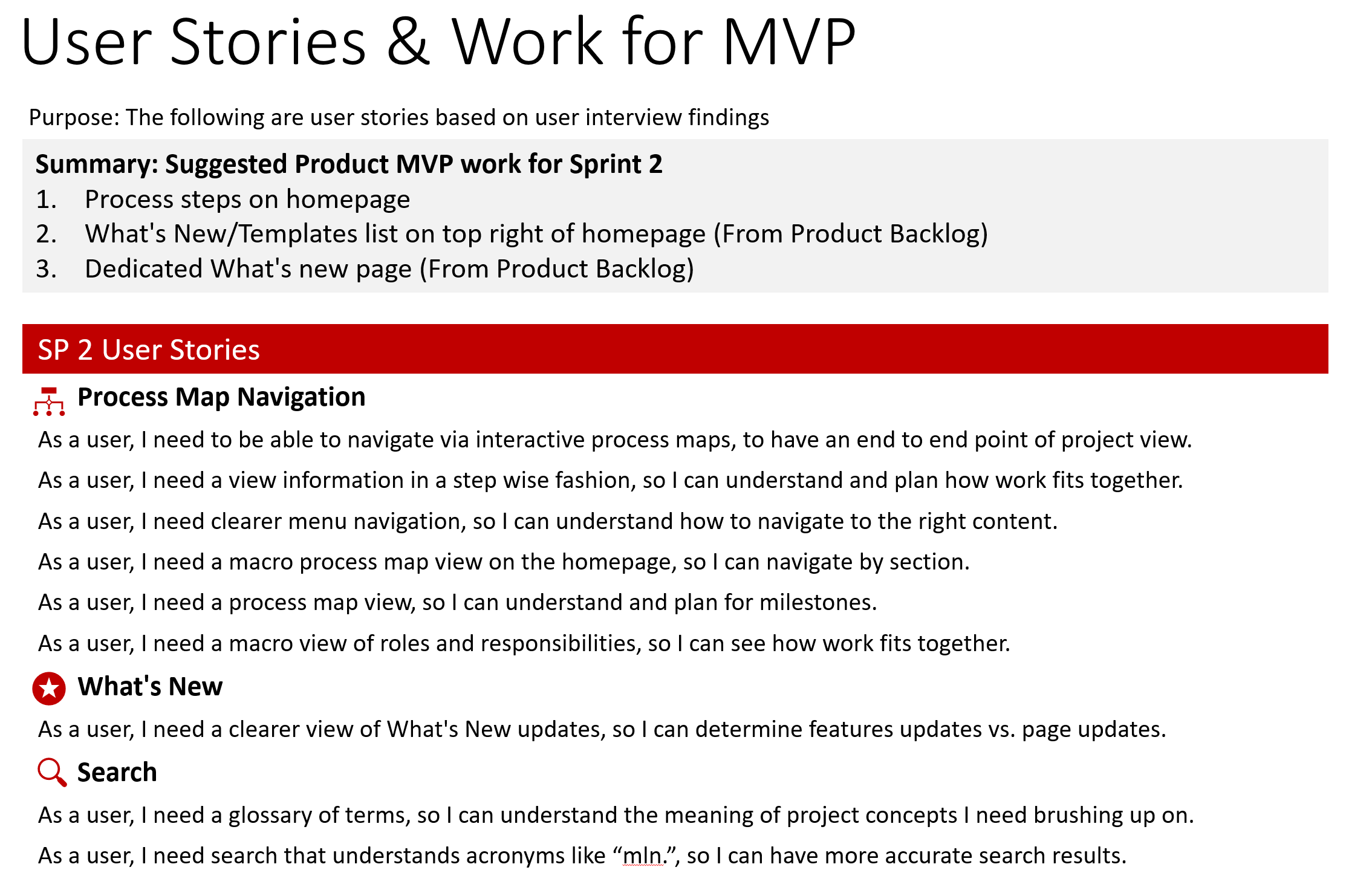
User stories are typically brief, informal descriptions of a specific piece of functionality, focusing on the value it provides to the end user.
Sprint User Stories
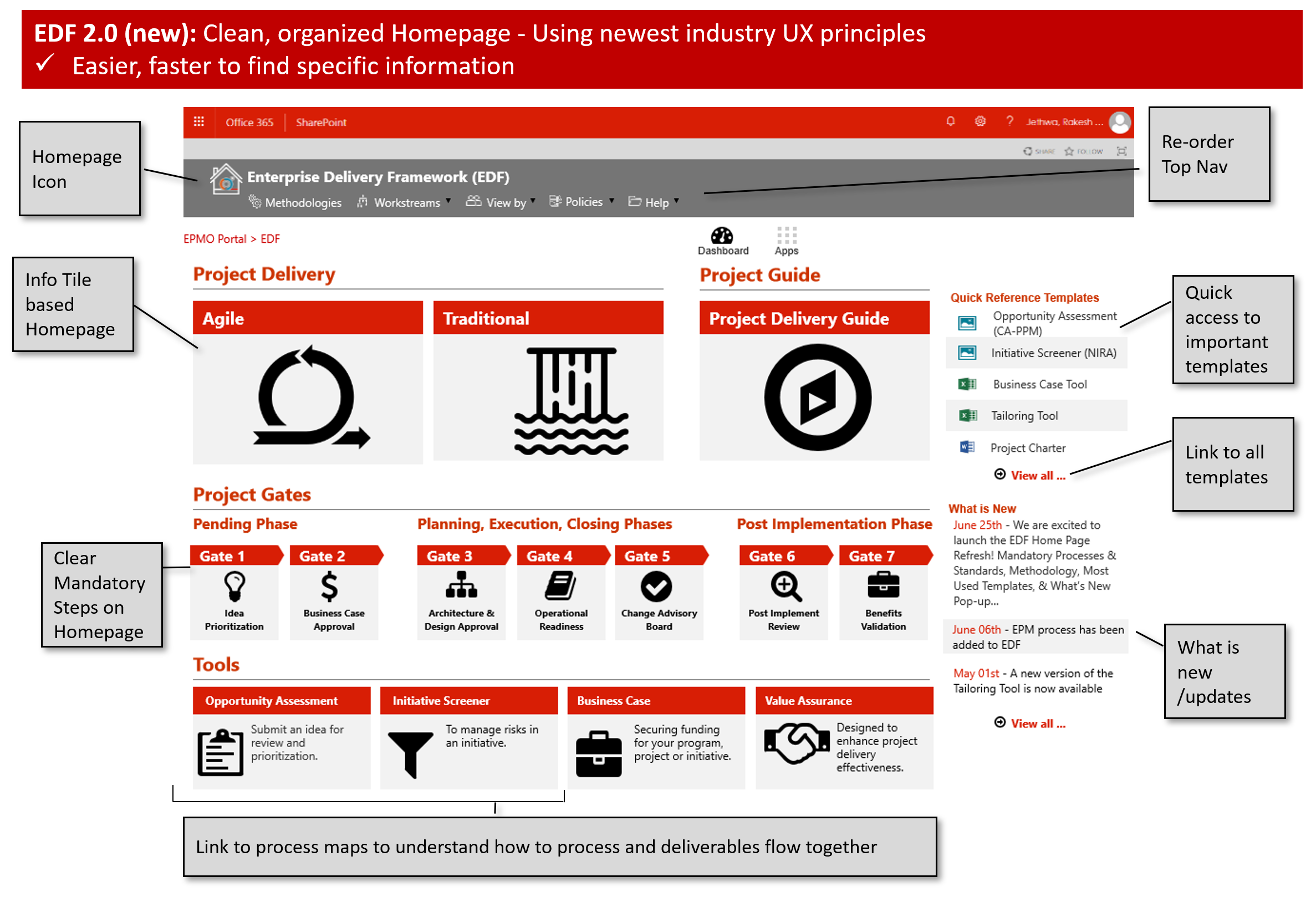
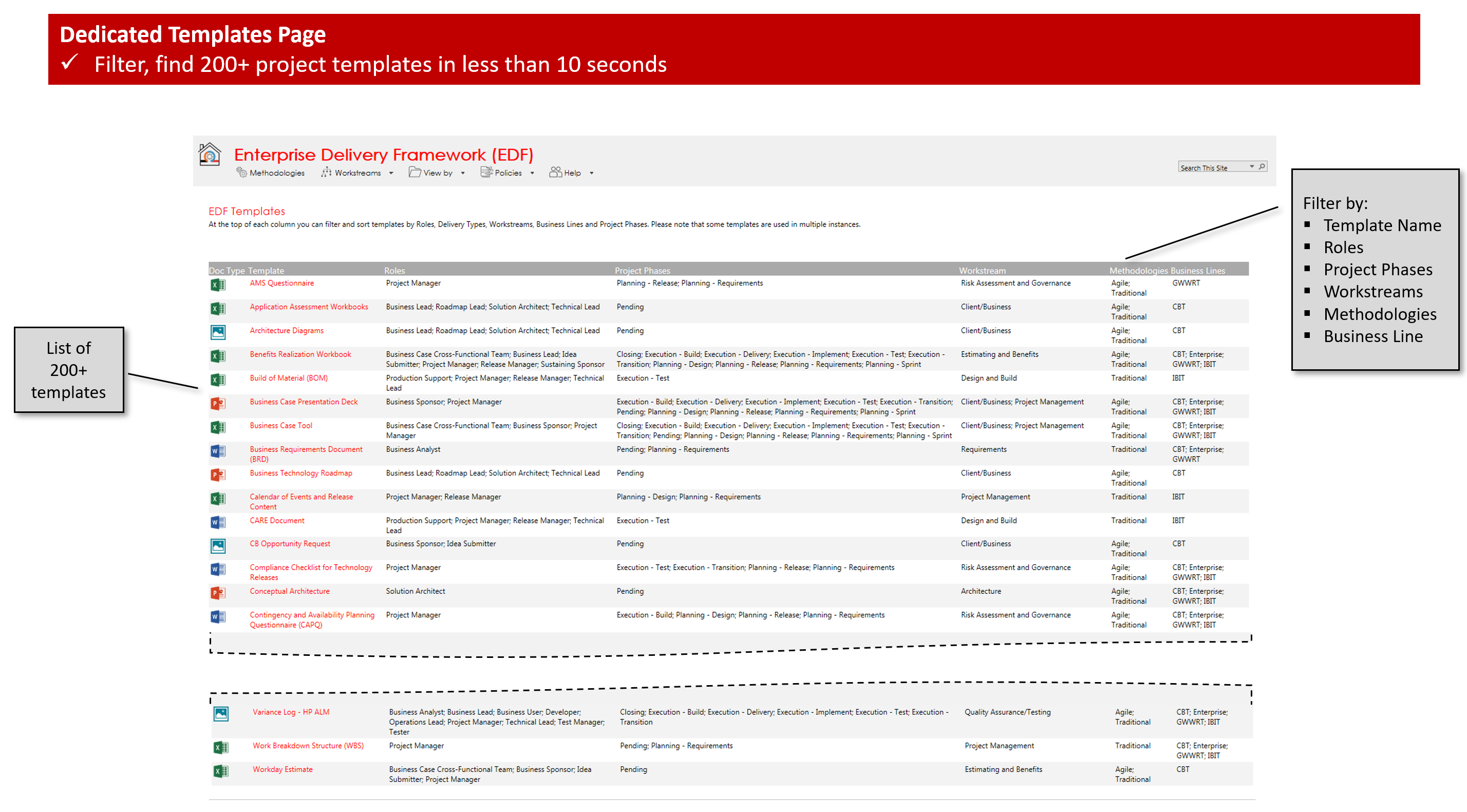
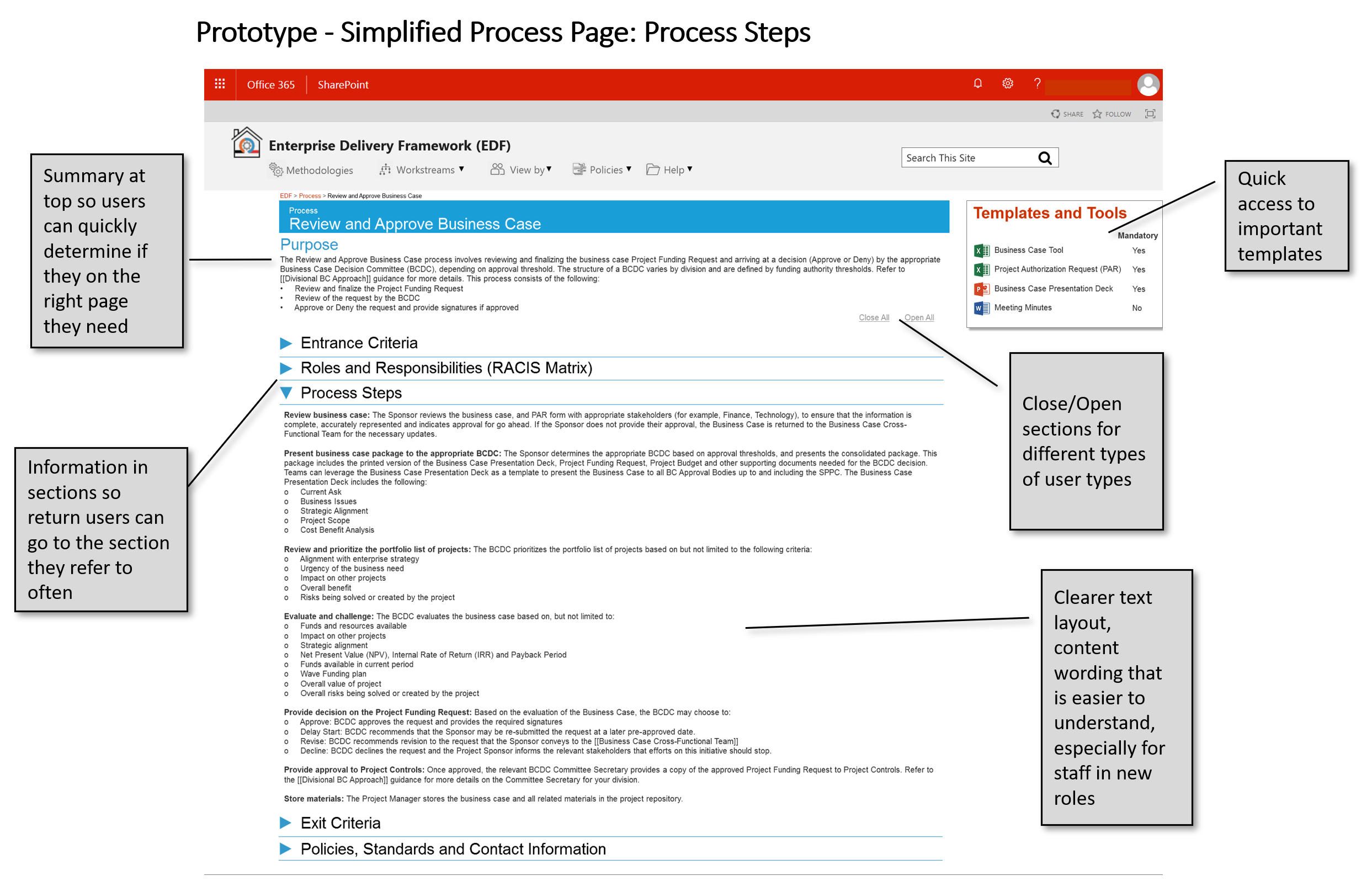
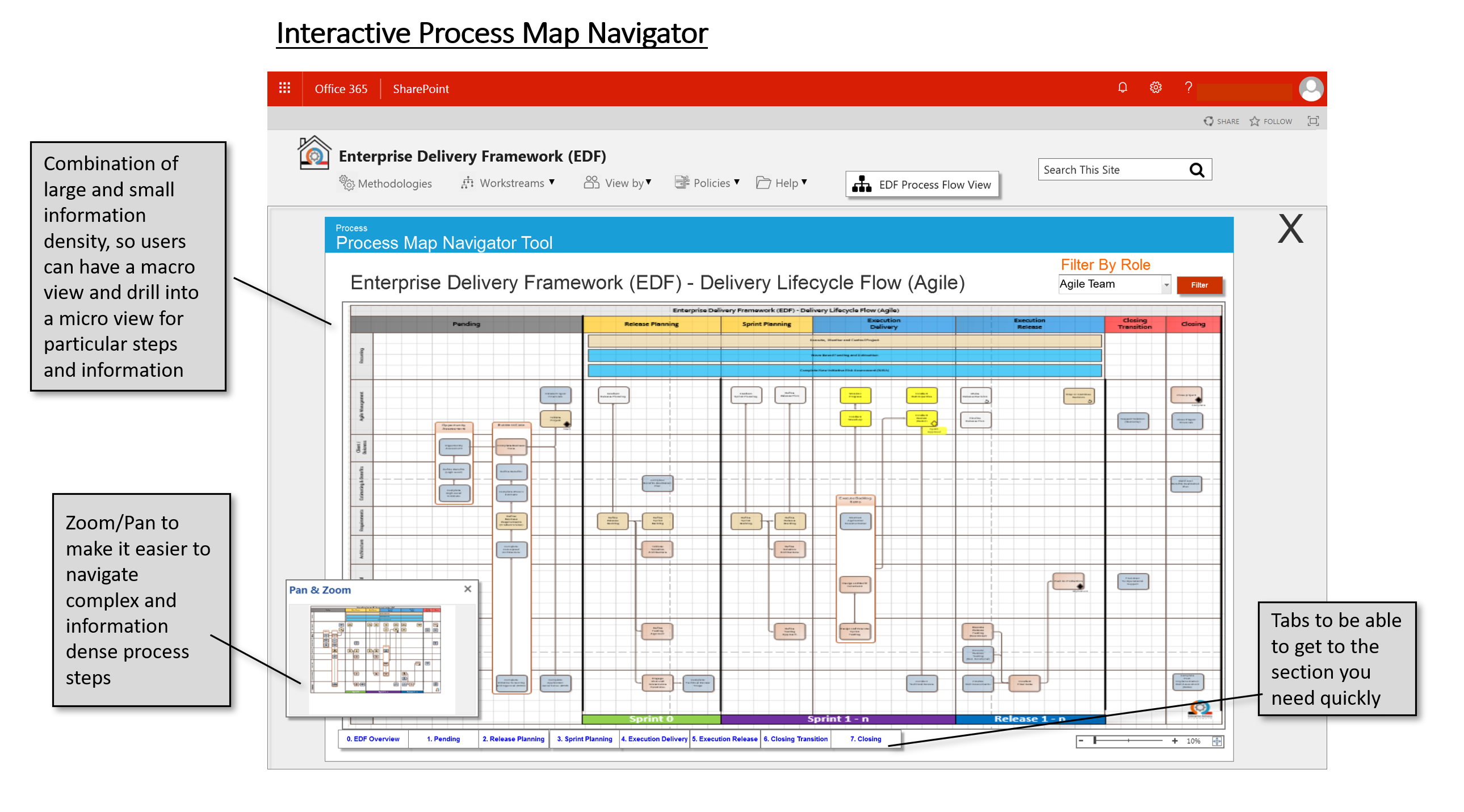
Part 8/9 - Iterative Annotated Wireframes and Prototypes
Clear direction and alingment, sign off efficiency
Iterative annotated wireframes and prototypes are key components of the iterative design and development process in user experience (UX) and product design.
They serve as valuable tools for refining and visualizing the design of the final product.
This iterative approach to wireframing and prototyping ultimately results in a more user-centric and effective final product.
- Clarifying the design's functionality and interaction details through annotations
- Allowing for user testing and feedback to identify issues and make necessary adjustments
- Ensuring that the final product aligns with user needs and expectations
- Facilitating collaboration and communication between designers, developers, and stakeholders.
Part 9/9 - Real Business Impact - Winning the Vision: Rollout Results
Measuring business value and impact
As a final measure of success for the new Employee Experience, the analytics reports provided valuable insights into data and performance metrics.
- Now a common practice, analytics reports are a powerful tool for businesses to enhance their decision-making, optimize operations, and achieve a competitive edge
- By harnessing data and insights, organizations can adapt to changing market conditions, improve customer experiences, and drive overall success